Settings
Click the Kempt icon in the browser toolbar. Changes apply to open YouTube tabs at once.
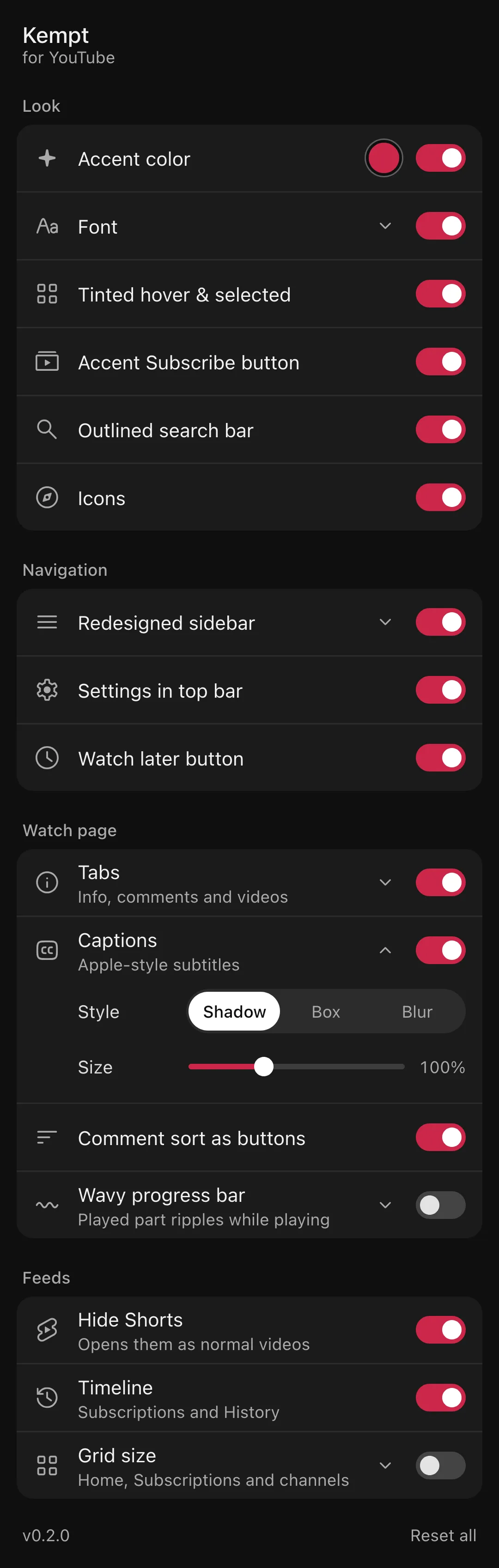
Switches
Section titled “Switches”| Group | Switch | Options | Default |
|---|---|---|---|
| Look | Accent color | Any color | On, #cb274a |
| Tinted hover & selected | On | ||
| Font | Plus Jakarta Sans, Inter, Geist, Figtree, System | On, Plus Jakarta Sans | |
| Accent Subscribe button | On | ||
| Outlined search bar | On | ||
| Icons | On | ||
| Navigation | Redesigned sidebar | Hide “You”, “Your channel”, “Your videos”, “Courses” | On, all hidden |
| Settings in top bar | On | ||
| Watch later button | On | ||
| Watch page | Tabs | Ask AI on or off; as an icon button or a tab | On |
| Comment sort as buttons | On | ||
| Comment search | On | ||
| Comment layout | On | ||
| Captions | Style Shadow, Box or Blur; Size 50% to 200% | On, Shadow, 100% | |
| Wavy progress bar | Animate wave | Off | |
| Feeds | Hide Shorts | On | |
| Timeline | On | ||
| Grid size | Videos per row (2 to 8), Shorts per row (3 to 10) | Off |
The color picker
Section titled “The color picker”The dot in the Accent color row opens a picker: swatches, a hue and saturation wheel, a brightness slider and a hex field. Everything that uses the accent follows it, including the tint behind selected items and the Subscribe button.
Sync and reset
Section titled “Sync and reset”Kempt saves settings with chrome.storage.sync, so they follow your browser account to other computers. The popup footer shows the version and a Reset all button; click it twice to confirm.
How it works
Section titled “How it works”The popup has no list of its own. It reads the same feature list the extension runs (src/features/index.ts) and draws one row per feature from its label, hint, icon, group and options. A new feature appears in the popup with no popup changes.
When a color or number option names a cssVar, Kempt writes it straight onto <html> as a CSS variable. Number options with slider: true draw as a range input and apply while you drag. Boolean options become attributes such as kyt-sidebar-hide-you, which the feature’s CSS matches. Live drags save at most every 400 ms, because storage.sync allows 120 writes a minute.