Look
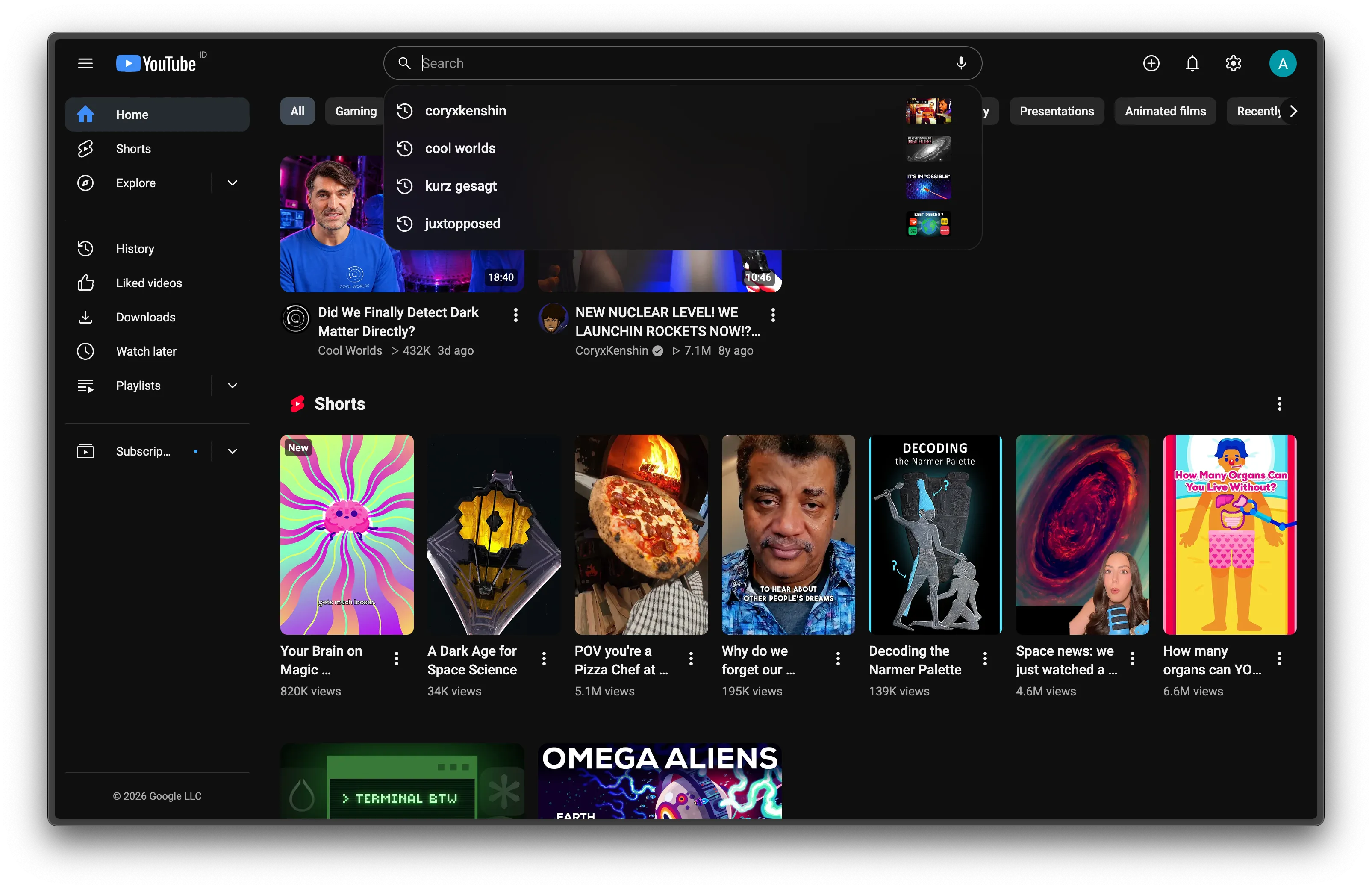
Five small switches make YouTube’s surfaces agree with each other. All but Font are CSS only.
Accent color
Section titled “Accent color”The accent is one color for every “selected” or “active” mark: chips, tabs, the progress bar, the selected sidebar icon. The default is #cb274a, the same red as the Subscribe button, so the page has one red. Pick any other color in the popup.
YouTube styles itself with CSS variables such as --yt-spec-static-brand-red. Kempt points them at --kyt-accent, plus a few targeted rules for chips, tabs and the progress bar. The popup saves your color; the content script writes it onto <html> as --kyt-accent, and everything follows.
One typeface for all of YouTube’s text, Kempt’s own labels included. The default is Plus Jakarta Sans. The popup also offers Inter, Geist, Figtree and System (your operating system’s UI font). With Captions on, captions use it too; with Captions off they keep the font set in YouTube’s caption settings.
The fonts ship inside the extension as variable WOFF2 files, so nothing loads from a font service. The feature adds one <style> of @font-face rules, split by unicode-range (Latin, Latin Extended, Cyrillic, Greek, Vietnamese where the font has them). The browser downloads only the faces the page’s text needs: about 50 KB for an English page. One CSS rule sets font-family on every element in the page, with YouTube’s own Roboto, Arial, sans-serif behind it, so Japanese, Korean or Hindi text falls back to YouTube’s fonts. Each font family name carries a kyt prefix, so a copy you installed yourself never stands in.
Tinted hover and selected
Section titled “Tinted hover and selected”Every hover, and every selected item such as the sidebar entry or a feed chip, gets a faint tint of the accent instead of YouTube’s grey.
The tint is translucent, color-mix(in srgb, accent 40%, #fff) at 14% in dark mode and 30% in light. It works on any background and follows a custom accent. Selected text stays in the normal text color and only the icon turns accent, because accent text on the dark tint falls under 3:1 contrast.
Subscribe button
Section titled “Subscribe button”Subscribe is the accent. Its text is white on a dark accent and black on a light one: the CSS reads the accent’s OKLCH lightness and switches at 0.68. Once you’re subscribed, the button goes back to neutral.
Search bar
Section titled “Search bar”The search box becomes one outlined pill, with the magnifier on the left and the microphone inside. Suggestions line up with the pill and use the same frosted surface as the top bar.
This one is CSS only. The search button moves left with flex order: -1, and the microphone sits inside the box. YouTube shipped a new search box (yt-searchbox) in 2025, and the rules cover both versions.
Light and dark
Section titled “Light and dark”Every color is a token in src/theme/tokens.css with a light and a dark value. Kempt follows YouTube’s own theme setting.