Watch page tabs
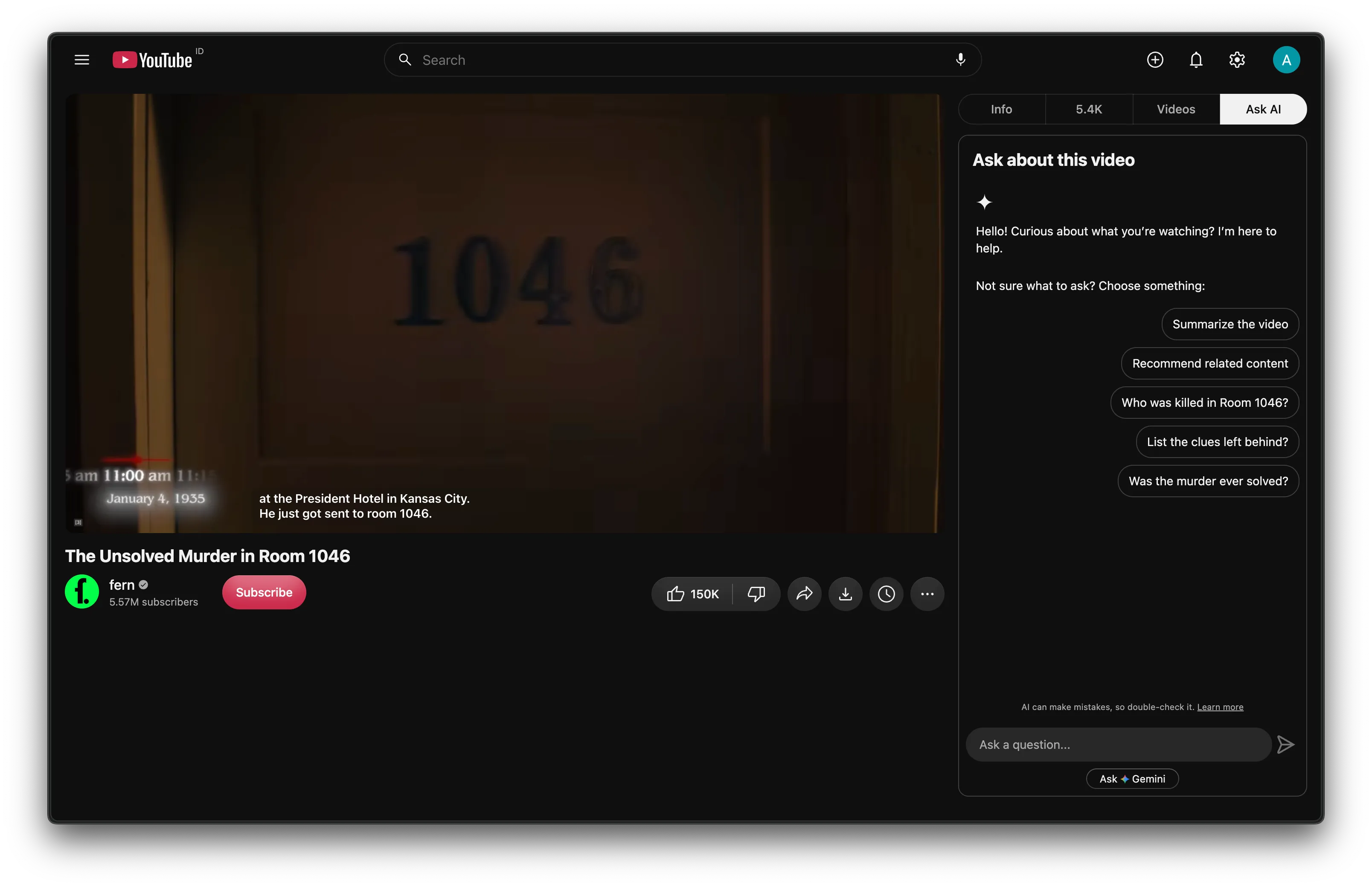
The right column of the watch page becomes one panel with a tab bar:
| Tab | Shows | When |
|---|---|---|
| Info | The description | Always |
| Comments | The comment section. The tab shows the total count, or an icon while there is no count. | Always |
| Videos | Related videos, and the playlist panel when you watch from a list | Always, open by default |
| Live chat | The chat | Live streams and replays with chat |
| Ask AI | YouTube’s Ask panel | If your account has it and the option is on |
The title, channel row and action buttons stay under the player. Only the description moves.
Settings
Section titled “Settings”The switch is Watch page → Tabs, with two options:
- Ask AI shows the Ask AI entry. It’s on by default.
- Show as keeps Ask AI as YouTube’s button under the video, moved first in the action row (the default), or makes it a full tab.
Behavior
Section titled “Behavior”- In the two-column layout the panel is one screen tall and only the open tab scrolls, so the video stays in view. In the single-column layout the whole page scrolls.
- A white pill slides to the selected tab.
- Cinema mode closes the open tab and reopens it when you leave cinema. Clicking a tab while in cinema leaves cinema.
- Anything another extension adds to the right column (a donation shelf, Return YouTube Dislike’s box) belongs to the Videos tab.
How it works
Section titled “How it works”Kempt adds a tab bar at the top of #secondary-inner, YouTube’s right column. The tabs move YouTube’s own elements and never copy them:
- The description and
ytd-commentsmove into boxes after YouTube’s own panels (#panels, the playlist, the chat and similar). When the feature turns off, they move back to where they came from. - Related videos and the chat stay where they are and only show or hide. The chat is an iframe: moving it would reload it.
- Hidden tabs use
display: none. YouTube’s lazy loaders (more comments, more videos) fire when the tab opens. - Every other tab shows a fixed list of children (the bar, its own box,
#panels,#chat-container) and hides the rest. A shelf YouTube adds later lands in Videos instead of stacking under the comments.
Only a click on a tab may press YouTube’s cinema button. If a reset from navigation, or from closing Ask AI, pressed it, the player would get stuck half switched.
The tab labels Kempt writes follow YouTube’s UI language. See Languages.
Limits
Section titled “Limits”- Ask AI is a YouTube experiment. It shows only on accounts that have it.
- Kempt hides the close button inside the chat and Ask panels. The chat’s is inside its iframe, so Kempt injects one rule into the frame each time it loads.